Your brand
Your customers see your name, your colour and your support contact in the panel and in the emails it sends them, instead of your hosting provider's. You set all of it on one page: Selling › Branding.
What you can set
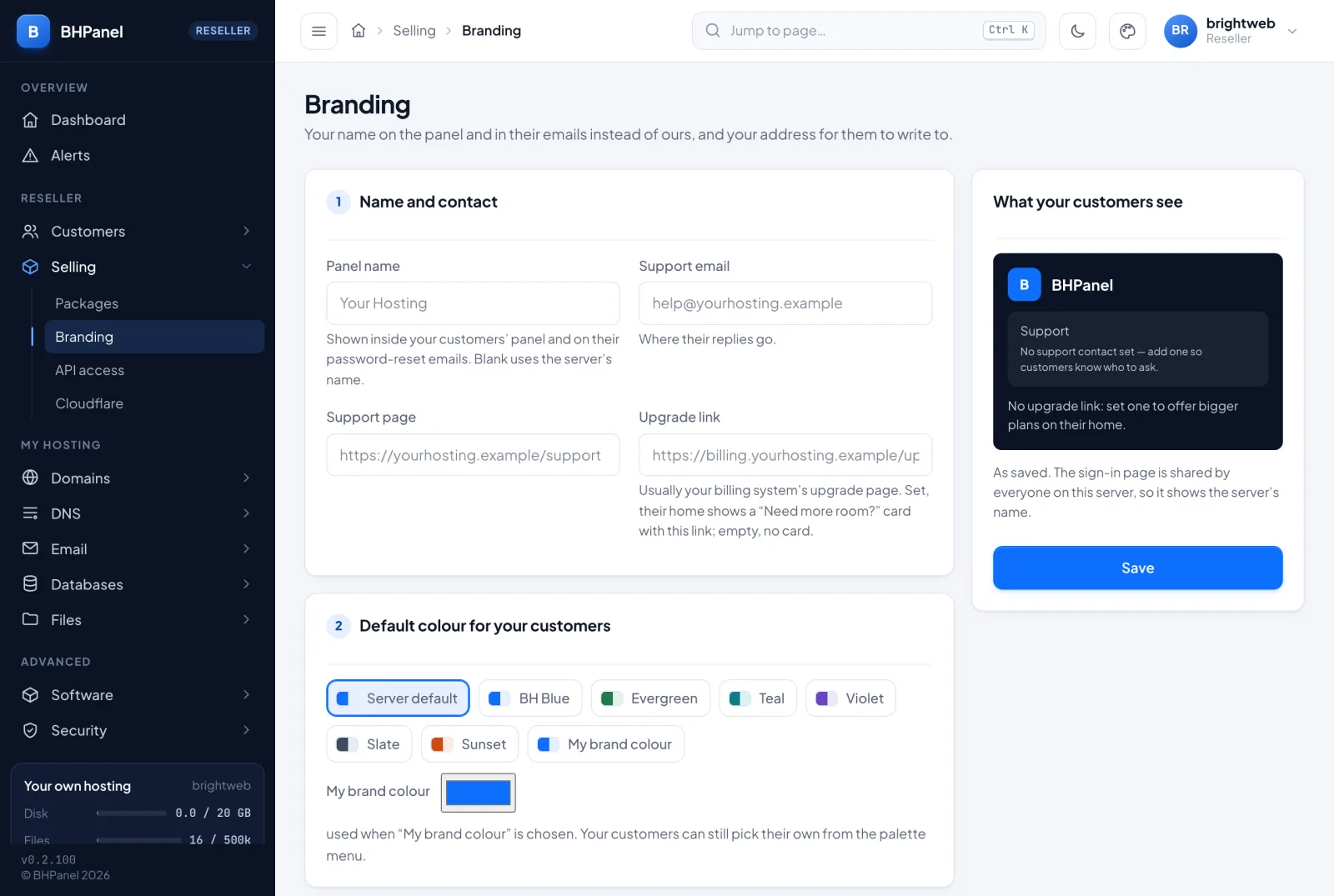
There is one form with two cards. Press Save when you are done.
Name and contact
- Panel name: up to 60 characters. Leave it blank to use your hosting provider's name. It cannot contain angle brackets, quotes or line breaks.
- Support email: an email address. Customers' replies to the panel's emails go here.
- Support page: a link. It has to start with
https://. - Upgrade link: a link to a bigger plan, usually your billing system's upgrade page. It has to be a plain
https://address with a host, up to 300 characters. When it is set, your customers' home page shows a "Need more room?" card that links to it. When it is empty, there is no card.
Default colour for your customers
Pick one:
- Server default: your hosting provider's colour.
- One of the preset colours.
- My brand colour: choose any colour with the colour picker. It is stored as a six-digit hex value such as
#0d6efd. The panel works out the lighter, darker and text colours from it, so you only pick one.
This is the colour your customers start with. They can still pick their own from the palette menu, and then they see theirs.
What there is not
You cannot upload a logo or a favicon. Wherever a logo would go, customers see your hosting provider's logo, or a mark with the first letter of the panel name when there is none. A logo is your hosting provider's setting.
Where your customers see it
- The top bar of their panel shows your panel name.
- The footer of every page shows "Need help?" with your support page and support email. It is left out when you have set neither.
- Their home page shows the "Need more room?" card, if you set an upgrade link.
- Colours across their panel follow your default colour, unless they chose another.
- Emails the panel sends them use your name and your support address. This covers password resets, the notice that two-factor sign-in was turned off for them, passkey notices and email-address change notices. Your support email is also the reply-to address.
- Suspended websites: when one of your customer's websites is suspended, the page visitors see carries your brand.
Your hosting provider's name stays on:
- The sign-in page. It is shared by everyone on the server, so it shows the server's name. The preview on the Branding page says this too.
- Anything you leave blank. A blank field falls back to your hosting provider's own value.
What you see yourself
You see the same brand you give your customers. When you sign in, your own panel shows your panel name and your support footer too.
The What your customers see card on the Branding page is a preview of what is saved, not of what you are typing. Press Save first, then check it. It shows your name, your support contact and whether the upgrade card will appear.
Customers cannot change your branding. A customer who tries is told that the name is set by whoever sold them the hosting.
Change or remove your branding
- Go to Selling › Branding.
- Change a field, or empty it.
- Press Save.
To remove everything, empty all four fields and set the colour to Server default, then press Save. Your customers go back to your hosting provider's name, colour and contact. If you only clear one field, that one falls back and the rest stay.
The address your customers sign in at
You do not set this on the Branding page, and there is no setting to choose a host name.
For each domain you host that has a website on the server, the panel can serve your customers at cpanel.<their domain>. On your own domains, it also serves you at whm.<your domain>. These are made automatically from the account's own domains, and a name only signs in the account that owns that domain. They work on the normal HTTPS port (443), and only when the domain's certificate covers the name and is in date.