Getting started as a reseller
A reseller sells hosting to their own customers. Your hosting provider gives you an allowance, and you create customer accounts inside it. This page shows where to sign in, what your home page tells you, and what the allowance means.
Where you sign in
Resellers sign in on the administrator side of the panel, not the customer side. Use the address your hosting provider gave you for your reseller login.
The sign-in page there says "Administrator and reseller sign-in. Customers sign in on the customer panel." If you sign in with the right password on the wrong side, the panel signs you out again and tells you which address to use.
Your customers sign in at their own address. They never see your reseller pages.
Your home page
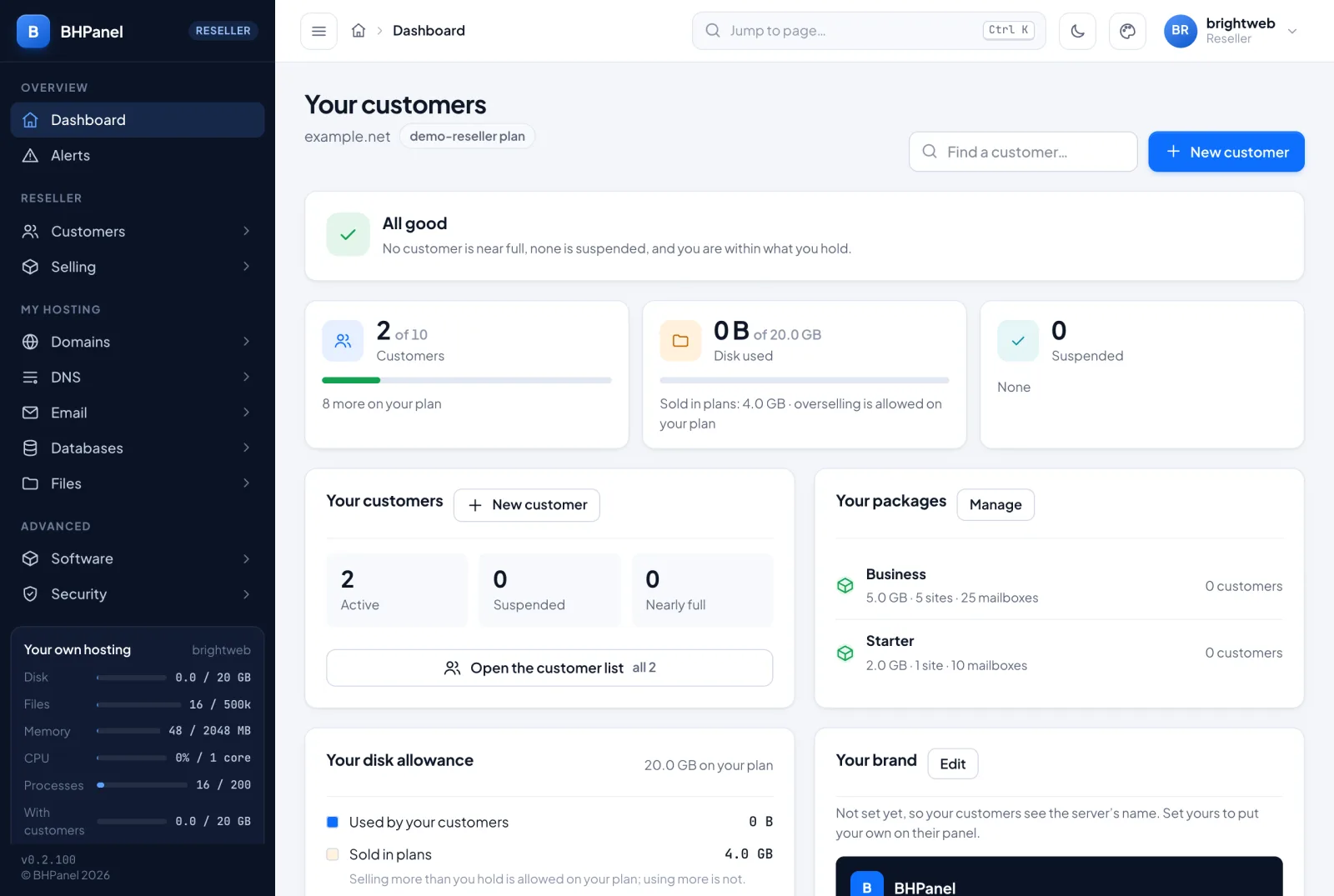
After you sign in, Dashboard is called Your customers. It shows your own plan name and these parts, from top to bottom.
The health card. It says All good when no customer is near full, none is suspended and you are within what you hold. Otherwise it lists what needs you, and each line has an Open link to the page that deals with it. It warns about:
- a full or nearly full disk pool
- an account near its own disk limit (databases go read-only and files stop saving at 100%)
- suspended accounts
Customers. How many accounts you have, out of how many your plan allows (or "No limit on your plan"), and how many more you can add. Click it to open the list.
Disk. Without overselling, this card shows Disk assigned in plans out of your allowance, and the disk actually used. If your plan allows overselling, it shows Disk used out of your allowance and the amount sold in plans.
Suspended. How many accounts are suspended, and the first few names.
Your customers. A summary of how many are Active, Suspended and Nearly full, with New customer and Open the customer list.
Your packages. The plans you made yourself, with their size and how many customers are on each. Manage opens the packages page.
Your brand. A preview of what your customers see: your name, a support contact and an upgrade link. Edit opens the branding page. Until you set a name, they see the server's own name.
Your disk allowance. One bar showing the disk your customers use and the disk you have sold in plans, against your allowance.
You and your customers, now. Your own account plus all your customers added together: disk, number of files, memory in use and CPU now (100% means one core). Below it are the most any one account may have on your plan. That is the top of what you can put into a package you sell.
My own hosting. Your own websites, mailboxes and disk. See below.
Your allowance (the pool)
Your reseller plan is one pool that your account and all your customers share. It covers:
- Disk. Your account plus every customer, and their kept leftovers.
- Transfer. The month's bandwidth of you and your customers together.
- Accounts. How many customers you may have.
- CPU, memory and processes. Your plan's limits are shared by everything in the pool. Ten customers do not each get a full allowance.
Each customer's own plan still limits that customer inside the pool.
Overselling
Your hosting provider decides whether your plan may sell more disk than you hold. If it may, you can sell plans that add up to more than your allowance. What you actually use can still not pass it. If it may not, a sale that would pass your allowance is refused. The dashboard says which applies to you.
When the pool is used up
- Disk full. Nothing in the pool can grow. Uploads fail, new email waits and databases become read-only. Sites keep working and files can be deleted. It starts again by itself once usage is under 95%. Free some space or ask your provider for a bigger plan.
- Customers using more than you hold. New accounts are refused until usage comes down.
- Transfer used up. You and your provider are told. New accounts and bigger plans are refused. Sites keep serving. Each account's own transfer allowance still applies.
The menu you see
The menu has these parts for you.
Overview has Dashboard and Alerts.
Reseller is your business:
- Customers › Accounts, Create account, Import accounts, Backups
- Selling › Packages, Branding, API access, AI access, AI assistant, Cloudflare
Some of these pages may only show when your hosting provider has the feature switched on.
My hosting is your own account, laid out like a customer's: Domains, DNS, Email, Databases and Files.
Advanced has Software, Security and more.
Your own hosting
A reseller also has a hosting account of their own, with websites, email, databases and files. It sits in the same pool as your customers. The My own hosting card shows your websites, mailboxes and disk.
It works exactly like a customer's account, so use the customer guide for it:
- Signing in and your profile
- Websites and domains
- Databases
- Files and backups
- WordPress and apps
- Advanced tools
Sign in securely
You hold the keys to all your customers' accounts, so protect your login. Open Edit profile from your user menu in the top bar. Under it, turn on:
- Two-factor, a code from your phone app on top of the password
- Passkeys, to sign in with your device's fingerprint, face or screen lock
The steps are the same as for a customer; see Signing in and your profile. Edit profile also has Password, Email address and Photo.
What a reseller cannot do
- Change server settings. Those belong to the administrator.
- See or touch another reseller's accounts. You see only your own customers.
- Be a customer of another reseller. A reseller is never another reseller's customer.
- Pass the limits of your plan, whether disk, transfer, accounts or the ceiling on what one account may have.
If you need more room or a change to your plan, ask your hosting provider.