Accounts and packages
An account is one customer: a login, a home folder, a disk quota, CPU and memory limits, PHP and a main website. A package is what the account was sold. This page covers everything you do with both, under the Accounts menu.
Accounts › All accounts
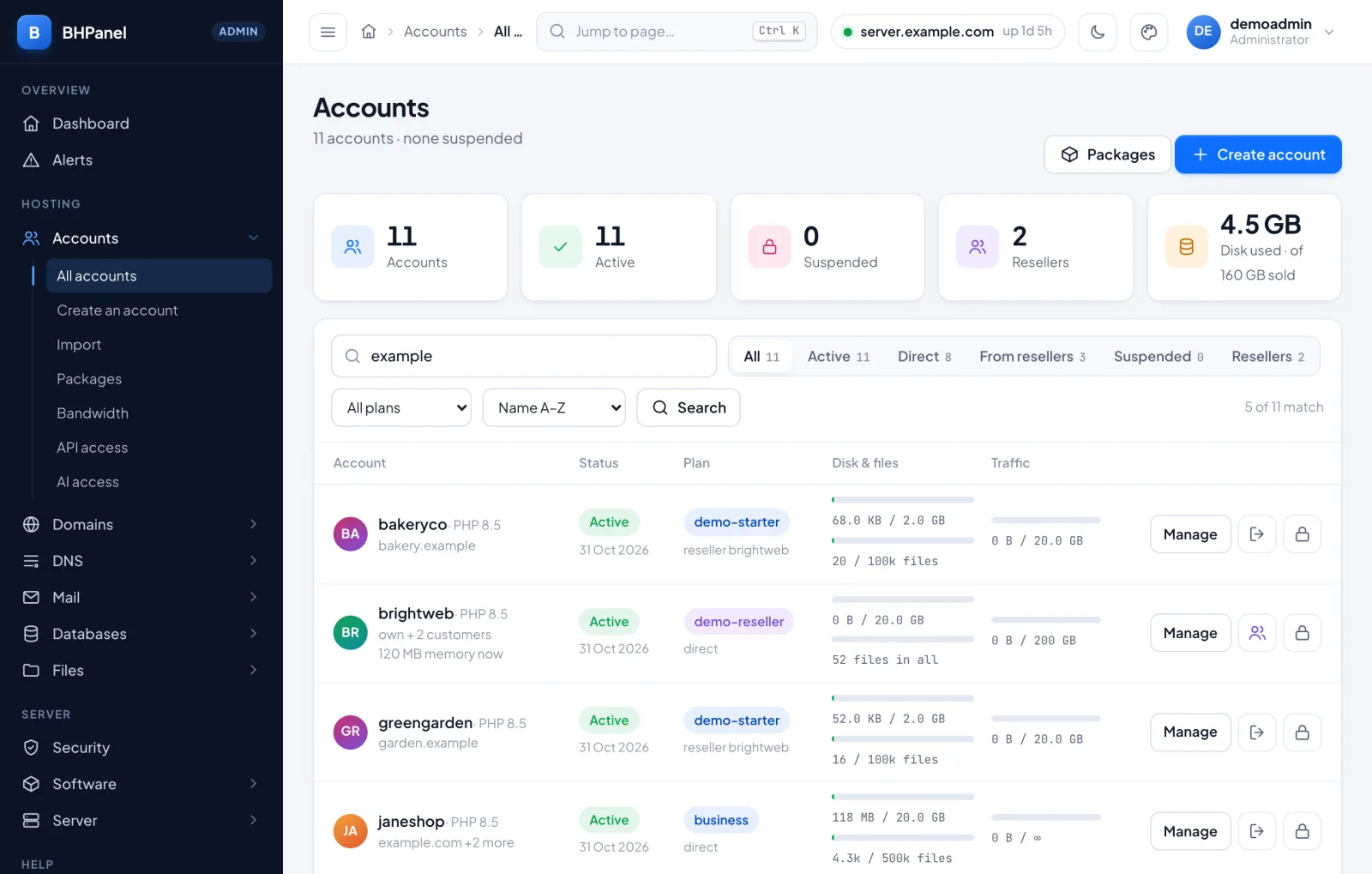
The list shows every account on the server, 20 per page. At the top, cards count Accounts, Active, Suspended and Resellers, and show the disk used against the disk sold. Click a card to filter by it.
Under the cards:
- Search finds a username, a domain or an email address.
- The chips narrow the list: All, Active, Suspended, Resellers. Once any reseller has customers, Direct (yours) and From resellers appear. Nearly full appears when an account is at 80% of its disk or more.
- All plans shows only accounts on one package.
- The sort box offers Name A–Z, Newest first and Most disk used.
Each row shows the status, the plan and who owns the account, disk and file use, and this month's web traffic. A reseller's row adds up the reseller and all its customers. A status of Bandwidth limit means the account is over its monthly traffic.
The buttons on a row are Manage (opens the account page), Log in as, and a lock to suspend it. A suspended account has a tick to unsuspend instead. Suspending asks for an optional reason, and takes the account's websites offline.
Accounts › Create an account
Fill in three cards, then press Create account.
1. Website and owner
- Domain is the account's main domain. BHPanel makes the website for it. The username is worked out from it unless you set one.
- Owner's email is where a password reset goes. It is not a mailbox on this server.
- Email them a link to choose their own password is ticked by default. The link works once and lasts 3 days. Without an email address it cannot be sent.
2. Plan. Pick a package. Each card shows its disk, CPU, memory and limits. You must pick one: every account is created on a package. With none yet, create one first (see below).
3. Options (all optional)
- Owned by is This admin, or a reseller. A reseller's plan limits then apply.
- PHP version is Server default or an installed version.
- Set the username and password myself opens two fields. Username is 3 to 16 characters, a lowercase letter first. It becomes the Linux user, the home folder and the database prefix, so it cannot change later. Password is at least 12 characters.
The next screen, Account created, shows the username and password once, with a block to copy. The password is stored as a hash, so nobody can show it again. If you sent the link, the password is not shown. If the link could not be sent, the screen says why and shows the password.
A note on the side of the form shows how much disk the server can still back, and whether overselling is on.
One account page
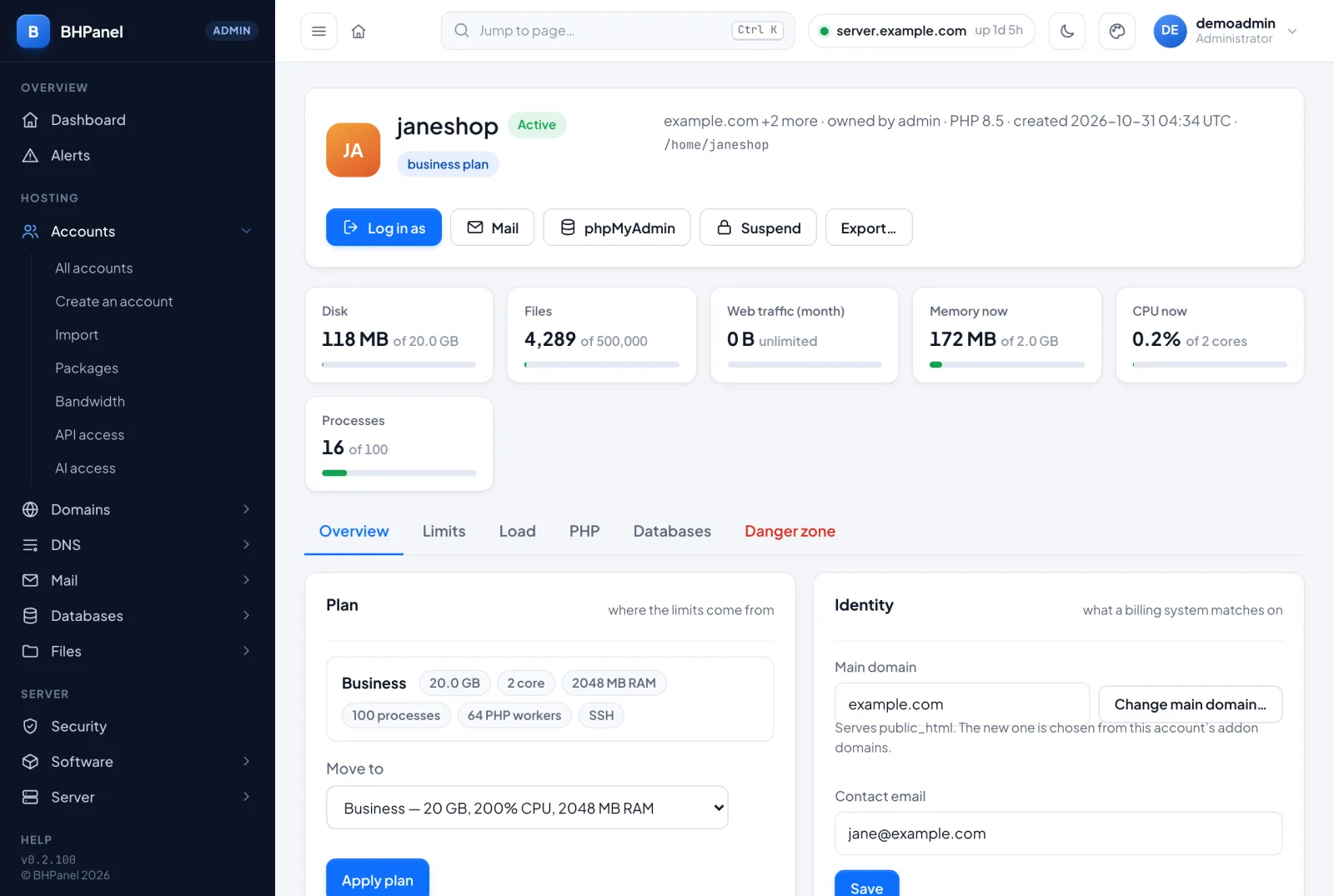
Manage opens the account. The top shows its status, plan, owner, PHP version, creation date and home folder. Beside the name are Log in as, Mail, phpMyAdmin (when installed and the account is not suspended), Unsuspend or Suspend, and Export…. A strip of meters shows disk, files, web traffic, memory, CPU and processes.
The tabs are Overview, Limits, Load, PHP, Databases, Danger zone, and Customers for a reseller.
Overview
- Plan. Move to a package, then Apply plan. It applies at once, to running processes too. An account on no plan has limits set by hand.
- Identity. Contact email and Save. The main domain is shown, with Change main domain…. The new one must already be an addon domain of this account. You choose what happens to the old one: keep it as an addon domain, redirect it, or remove it as a website. The username never changes. SSL and DNS are not touched.
- Change owner… moves a customer to a reseller or back to you. The account must fit in that reseller's plan. Its PHP restarts once, so its sites pause for a moment.
- Reset password shows a new password once.
- Email a set-password link goes to the contact email. The current password keeps working until they choose a new one.
- Turn off two-factor appears only when two-factor is on. Use it when they have lost their phone and recovery codes. They are emailed that it happened.
- Dedicated IP. Pick a free address, or none, then Save. It needs the Nginx + Apache web stack. Add addresses under Server › Network.
- Websites lists the account's sites with their PHP version and SSL state.
Limits
These normally come from the plan. Changing them here sets this one account apart. Re-apply the plan puts it back on the plan's limits.
- Disk. Disk (MB) and Files, then Save disk limits.
0is unlimited. - CPU, memory and IO. CPU (% of a core), Processes, Memory max (MB), Throttle at (MB), IO weight, IO speed (MB/s), then Save limits. Throttling must not be above the maximum.
- In force now shows what the system actually loaded.
PHP
Change version and Switch set the account's PHP. Restart PHP restarts it. Edit php.ini settings sets values the account's sites cannot raise again. Empty means the server default, and saving restarts the account's PHP. PHP per site gives one site its own version, inside the account's limits.
Danger zone
- Suspend account takes the sites offline and leaves the files alone. The Reason is shown to the customer. Unsuspend account reverses it.
- Delete this account. Type the username to confirm. It removes the Linux user, its PHP, limits, quota and DNS zones. Without Also delete all files, the home folder stays on disk. With it, every file is gone and this cannot be undone.
Export
Export… makes one .tar.gz for another BHPanel. It holds files, databases, mail, DNS, certificates, cron, FTP and settings. Enter a passphrase of 16 characters or more, twice. It seals the passwords. The file is made in /home and removed after a day. See Migrating to BHPanel.
Accounts › Packages
A package sets the limits and options for every account on it. Change it and all those accounts change at once. The chips split the list into All, Shared, Reseller and Resellers' own. Each package has Edit, Re-apply and Delete. A package with accounts on it cannot be deleted. Move them first.
New package opens the form: Basics, Resources, What it may create, Shared services and Options. Type is Shared hosting or Reseller — may create accounts. The limits are explained in Plans and performance. Reseller plans are covered in Reseller customers.
Accounts › Bandwidth
This lists the web traffic of every account for the month, counted every ten minutes. It starts again on the 1st. Past months are in the tabs above the table. The table shows owner, plan, Used, Allowance and Status: OK, Near limit (80% or more) or Blocked. A reseller's row also shows its customers' total. Count now counts straight away.
Only web traffic is counted. A blocked account's sites show "Bandwidth Limit Exceeded" until the 1st, or until you raise the plan's allowance. Raising it brings the account back at once.
Server › Leftovers
Deleting an account, a backup or an app can leave data behind. Server › Leftovers lists it so a mistake can still be undone. The kinds are Kept homes, Server backups, Restore points and App backups. Search by account or path, or filter by kind.
Each item has a removal date. A kept home counts against the reseller who owned the account until it is removed.
- Keep longer adds 7, 14 or 30 days, or Until I remove it.
- Remove now deletes it at once. Type the account name to confirm. This cannot be undone.
- Need a look counts items that could not be removed yet.
Under Settings, choose how long new leftovers are kept: 7, 14, 30 or 60 days. You can also have the server's contact address mailed a day before an item is removed. Remote backup copies are not listed here. Each destination keeps them by its own retention. See Backups.